Stay ahead with the latest from Old Well Labs
Get product updates and insights delivered straight to your inbox.


In June, we launched an AI-powered Who to Follow feed, added new features on top of our LP data with Allocator Groups and Documents, refreshed the Employee Changes feed, augmented Fund Returns with a full risk and return view, and made it easier see and request access to manager documents.
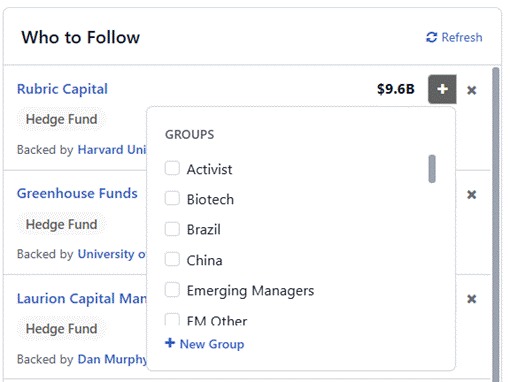
Who to Follow is now live on the bottom right side of your dashboard. Powered by AI, it looks across over 22,000 managers in OWL and provides a tailored list for you to follow. With one click, you can add managers to a group or watchlist, creating a feed that reflects the managers and events you care about. You can also improve the recommendations by using the “x” to remove managers from the list.
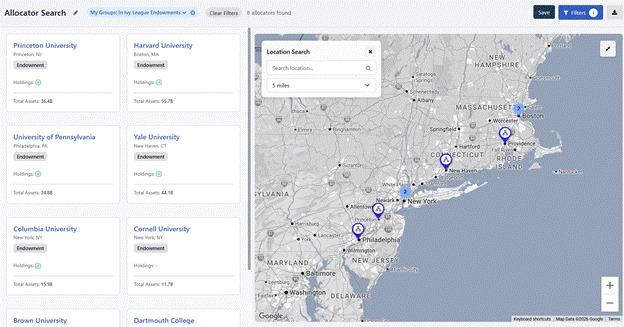
Several of OWL’s features that you use to find and monitor managers can now be used for tracking the 12,000+ allocators who have profiles in OWL.
Allocator Groups. You can now bundle allocators into groups to monitor your favorite LPs. Create and manage allocator groups alongside your manager groups, then view them in table, map, and feed formats with allocator-specific columns. Users can add an allocator to a group directly from the allocator’s profile or by hovering over the allocator name on the main feed. We will soon add additional monitoring features for allocators including alerts and notifications for events like new documents or updated holdings.
Allocator Docs. Allocators docs are now available directly on OWL. These docs show the latest investment decisions, holdings, meeting minutes, and annual reports from your favorite LPs. Over time, we expect to use these docs to alert users when relevant allocator mandates or portfolio shifts occur. A few we recommend checking out:
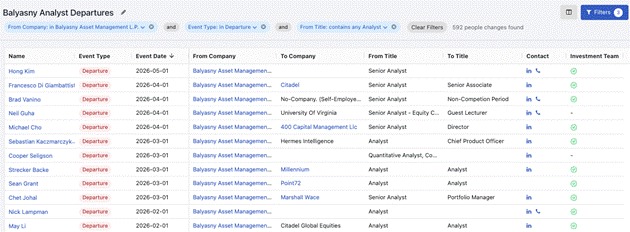
We refreshed our Employee Changes feed, providing a cleaner way to use OWL's people data to track hires, promotions, and departures. You can save custom searches (i.e. “Show me all recent analyst departures from Balyasny”) or create dashboards specifically for your groups, making it easy to follow team movement at the managers you care about.
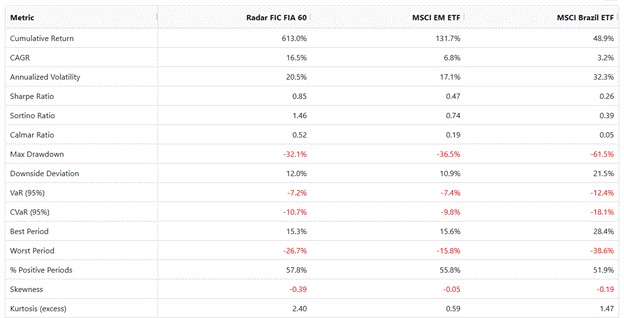
Building on the launch of Fund Returns in May, we added a full Risk & Return view for actual manager returns. Alongside monthly returns, LPs on the platform can now see actual performance and risk metrics – cumulative return, CAGR, volatility, Sharpe and Sortino ratios, drawdowns, and more – and compare them directly against benchmarks. As always, managers contributing data to the platform control what they share and with whom.
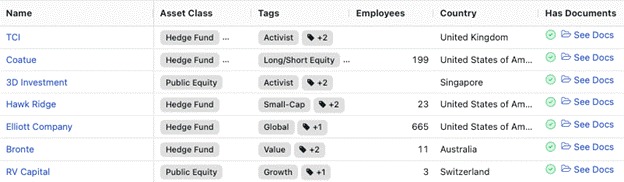
As we get more manager and allocator docs on OWL, we made those documents easier to discover. “Has Documents” is now live as a column across manager and allocator search: any profile with shared documents is clearly flagged, and you can jump straight into those documents from the search results. We have also created saved searches (linked above) for both managers and allocators that have documents on the platform, enabling you to easily narrow your searches by that criteria.
As a reminder, in April we launched the First 50 – an invite-only founding cohort of managers joining and contributing private data to OWL. Thank you to all of our allocator users who have invited managers to the First 50. It matters to us that OWL's existing users shape the community going forward. We continue to make it easier for connections between managers and allocators to happen on the OWL platform. If a manager is on OWL, allocators can directly request access to their documents; if a manager is not yet on OWL, allocators can invite them to join. In both cases, managers now directly receive an email when an allocator requests access or extends an invitation. Every manager in the First 50 is there because an allocator wanted them on OWL. Most are invited directly; managers can also apply, and we add them only where there's real interest from our community.
.jpeg)